
Outlook Backup Assistant7.1 - Download
You'll be able to download in few seconds.
Publisher Description
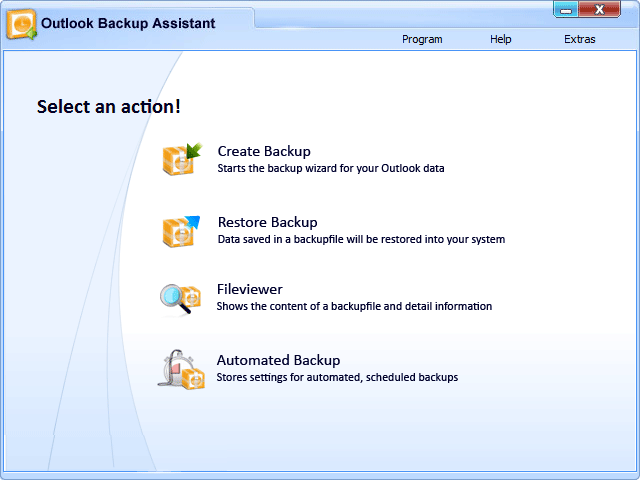
Outlook Backup Assistant allows you to easily backup all your Outlook data and settings with just a few clicks.
Doing backups manually is nearly impossible, as Outlook stores data in multiple locations that differ by Outlook version and Windows version. Outlook Backup Assistant supports all Windows and Outlook versions and always ensures a complete backup with easy restoration.
The backup is complete: Not just emails are backed up, but everything important, including all data and settings. The whole backup is stored in a single compressed ZIP file. You can verify the backup files for errors to ensure data integrity.
The backup file can be optionally encrypted with a password to ensure maximum security. Both standard ZIP encryption and strong 256-bit AES encryption are supported.
Outlook Backup Assistant includes an inbuilt backup File Viewer which allows you to easily view and restore your backups, with just a few clicks.
Outlook Backup Assistant supports automated backups as well. Automated backups can be scheduled and executed as often as needed.
Compared to similar products, Outlook Backup Assistant really shines in 3 areas:
1) Ease of use. Everything can be accomplished with just a few clicks using a wizard.
2) Complete backups. Only Outlook Backup Assistant backups over 30 categories of Outlook related data (including Emails, Contacts, Calendar, Tasks, Notes, Email Accounts, Exchange Accounts, Exchange Signatures, Program Settings, Windows Address Book, and much more.) All that can be saved in a single backup file, which is verified, compressed, and optionally encrypted.
3) Easy restoring and backup viewing using the inbuilt backup File Viewer. You can just double-click the backup file to open it in the inbuilt backup File Viewer.
You can also optionally install an Outlook add-in, which will run automatic backups, or remind you when a backup has not been made for a long time.
About Outlook Backup Assistant
This Backup & Restore program is available in English. It was last updated on 29 September, 2026. Outlook Backup Assistant is compatible with the following operating systems: Other, Windows.
The company that develops Outlook Backup Assistant is Dextronet. The latest version released by its developer is 7.1.
The download we have available for Outlook Backup Assistant has a file size of 3.1 MB. Just click the green Download button above to start the downloading process. The program is listed on our website since 2013-02-22 and was downloaded 0 times. We have already checked if the download link is safe, however for your own protection we recommend that you scan the downloaded software with your antivirus. Your antivirus may detect the Outlook Backup Assistant as malware if the download link is broken.
How to install Outlook Backup Assistant on your Windows device:
- Click on the Download button on our website. This will start the download from the website of the developer.
- Once the Outlook Backup Assistant is downloaded click on it to start the setup process (assuming you are on a desktop computer).
- When the installation is finished you should be able to see and run the program.
Program Details
System requirements
Download information
Pricing
Version History
version 7.1
posted on 2013-02-22
Full compatibility with Windows Vista and Outlook 2007; Perfect integration into Outlook with the Outlook-AddIn;Inclusion of five new data types and settings to the backup
Disclaimer
External Download
We do not host Outlook Backup Assistant on our servers. We did not scan it for viruses, adware, spyware or other type of malware. This app is hosted by the software publisher and passed their terms and conditions to be listed there. We recommend caution when installing it.
The external download link for Outlook Backup Assistant is provided to you by apps112.com without any warranties, representations or guarantees of any kind, so access it at your own risk.
If you have questions regarding this particular app contact the publisher directly. For questions about the functionalities of apps112.com contact us.
